Rabu, Juni 11, 2008

Should I Give Up on Google Adsense ?

My friend said to me that Google AdSense supports Indonesian language, but after read his email, I found this link.

Now I know why another friend of mine warn me when I used Indonesian language as content of this blog.

Talking about Google Adsense, I -almost- lost my hope to earn some buck from it.
It's -almost- impossible to make my reader click on Google Adsense banner, as I don't do it while I surf to another blog.

So if you have a good experience how to earn money from Google Adsense, please share it with me senyum

Thank you...

===================================================================

Google AdSense supports publishers in several different languages. Applications for participation in the program can be for sites with content primarily in:

Arabic Hungarian
Bulgarian Italian
Chinese (simplified) Japanese
Chinese (traditional) Korean
Croatian Norwegian
Czech Polish
Danish Portuguese
Dutch Romanian
English Russian
Finnish Serbian
French Slovak
German Spanish
Greek Swedish
Hebrew Turkish

In addition, AdSense for search is available in Indonesian, Thai, and Vietnamese. These languages are not supported for AdSense for content pages.

You can select your site's primary language during the application process. If you're approved, AdSense will serve relevant ads to your pages in the appropriate language, even if your site contains multiple supported languages.

Please also be aware that placing the AdSense code on pages with content primarily in an unsupported language is not permitted by the AdSense program policies.


Jumat, Juni 06, 2008

New Blogspot : HotBookmark

I decided to create one more blog to collect my bookmark, instead using create-export-import bookmark from Mozilla Firefox bookmark facility.

So if my operating system crash or have a BSoD, my bookmark still safe in that blog

I also create that blog to share my bookmark for you :)

Finally this is that blog ... http://hotbookmark.blogspot.com

Start to collecting ...

Senin, Juni 02, 2008

Tutorial Create Alexa Widget

- Kangkam -

How can we know how many people visit our website or blog ?
How many people links to our website or blog ?

Yes, that question crossed in my mind when I was thinking about Google AdSense.
So I googling around to find any widget that can count how many people who visit my blog.

With keyword "site rating" I found Alexa in top of my search.
And here we go the tutorial to put Alexa on blogspot.

Ok, let's start ...


Choose option Widgets


Choose what your desire type will show to your blog / website.

Fill the input form as requested


Choose what is your desire to show up to your blog
There is 3 options :
1. Traffic Graph Stat
2. Site Stats
3. Traffic Rank

I choose the last one, because it's simple and fit on my blog space.


After you klik build widget you have another three options script that you can copy paste to your blog.


If you have classic template for your blog, you should now how to add that script to your template :D

- Kangkam -

Minggu, Juni 01, 2008

Tutorial Optimize Blogspot for Google Adsense

- Kangkam -

This tutorial is very very very important to optimize blogspot

Tutorial blogspot : Read More

Tutorial blogspot : Meta Search

Tutorial blogspot : Add Yahoo Smilies

Tutorial blogspot : Create DTree Menu

Thank you for kang rohman minumcium,
I just don't know how to link back to his website

- Kangkam -

Tutorial Howto Install Squid on Windows

- Kangkam -

Squid is opensource software that use by many server for :
1. control an internet access
2. share bandwidth
3. faster loading process for a website that have open before
4. etc... :D

You can download a squid for windows version here or here

Now this is the step by step configuration :

download squid-2.6.STABLE18-bin-DELAYP.zip

extract to C:

enter C:\squid\etc folder

open squid.conf.default and save as to squid.conf

open mime.conf.default and save as to mime.conf

open cachemgr.conf.default and save as to chachemgr.conf

open squid.conf with notepad or wordpad

press ctrl + F buttons (to search a word)

find our_networks word
#acl our_networks src 192.168.1.0/24 192.168.2.0/24
#http_access allow our_networks
delete # / uncomment them, so it will be like this :
acl our_networks src 192.168.1.0/24 192.168.2.0/24
http_access allow our_networks
press ctrl + F button again

find visible_hostname word
# TAG: visible_hostname
# If you want to present a special hostname in error messages, etc,
# define this. Otherwise, the return value of gethostname()
# will be used. If you have multiple caches in a cluster and
# get errors about IP-forwarding you must set them to have individual
# names with this setting.
#
#Default:
# none <-- change="change" font="font" style="font-style: italic; font-weight: bold;">#none
with ... i.e. localhost
# TAG: visible_hostname
# If you want to present a special hostname in error messages, etc,
# define this. Otherwise, the return value of gethostname()
# will be used. If you have multiple caches in a cluster and
# get errors about IP-forwarding you must set them to have individual
# names with this setting.
#
#Default:
visible_hostname localhost
press ctrl + F button again

find dns_nameservers word
# TAG: dns_nameservers
# Use this if you want to specify a list of DNS name servers
# (IP addresses) to use instead of those given in your
# /etc/resolv.conf file.
# On Windows platforms, if no value is specified here or in
# the /etc/resolv.conf file, the list of DNS name servers are
# taken from the Windows registry, both static and dynamic DHCP
# configurations are supported.
#
# Example: dns_nameservers 10.0.0.1 192.172.0.4
#
#Default:
# none
change #none with your dns server (i.e. : 202.134.0.155 or 202.134.2.5 or 208.67.222)
# TAG: dns_nameservers
# Use this if you want to specify a list of DNS name servers
# (IP addresses) to use instead of those given in your
# /etc/resolv.conf file.
# On Windows platforms, if no value is specified here or in
# the /etc/resolv.conf file, the list of DNS name servers are
# taken from the Windows registry, both static and dynamic DHCP
# configurations are supported.
#
# Example: dns_nameservers 10.0.0.1 192.172.0.4
#
#Default:
dns_nameserver 208.67.222.222
save and close squid.conf document


enter c:\squid\sbin directory
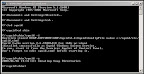
type C:\squid>sbin\squid.exe –i

then type C:\squid>sbin\squid.exe –z

open start menu - setting - control panel - administrative tools - services

find service squid

click start


open browser (i.e. mozilla)

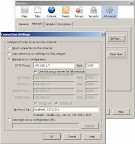
choose from menu bar : tools - option - network - setting

choose manual proxy and enter your computer ipaddress with default squid port (3128)
press ok and ... browsing :)

have it try ...

- Kangkam -