Tampilkan postingan dengan label windows. Tampilkan semua postingan

Minggu, Januari 08, 2012

MySQL : mysqldump with -w option on Windows XP

Case : You have a big size of mysql database table on windows xp machine and you want to dump database table with "where" condition
Solution : using -w option

set_time_limit(0);

$username = "root";
$password = "toor";
$hostname = "localhost";
$sConnString = mysql_connect($hostname, $username, $password)
 or die("Unable to connect to MySQL");

$connection = mysql_select_db("Country",$sConnString)
 or die("Could not select DB");

$sql = "select * from tblkelurahan where left(KelurahanID,4)='3277'";
$query = mysql_query($sql);

while ($fetch = mysql_fetch_object($query)) {
 $namafile = $fetch->KelurahanID;
 $command = "C:xampp\\mysql\\bin\\mysqldump.exe --add-drop-table -uroot -ptoor -w\"KelurahanID='$namafile'\" Indonesia tblpenduduk > $namafile.sql";
 system($command);
}

Minggu, Januari 02, 2011

Flash CS3 : Create Dynamic Text Box with Scrollbar


var url:String = "menu.txt";
var loadit:URLLoader = new URLLoader();
loadit.addEventListener(Event.COMPLETE, completeHandler);
loadit.load(new URLRequest(url));

function completeHandler(event:Event):void {
menu.text = event.target.data as String;
mytext_scroll.update();
}


modified from :

http://www.tyronedavisjr.com/2007/12/03/flash-cs3-uiscrollbar-scroll-arrows-not-displaying-on-dynamic-text/

Flash CS3 : Load External Text File Data

var url:String = "bio.txt";
var loadit:URLLoader = new URLLoader();
loadit.addEventListener(Event.COMPLETE, completeHandler);
loadit.load(new URLRequest(url));

function completeHandler(event:Event):void {
biotext.text = event.target.data as String;
}


http://www.actionscript.org/forums/showthread.php3?t=135839

Flash CS3 : Button gotoAndPlay


stop();

nextButton.addEventListener(
MouseEvent.MOUSE_UP,
function(evt:MouseEvent):void {
//trace(evt.target.parent.parent.name);
evt.target.parent.parent.gotoAndPlay(11);
}
);


modified from :

http://www.quip.net/blog/2007/flash/making-buttons-work-in-flash-cs3#comment-113406

Jumat, Desember 24, 2010

Excel - Delete row where specific cell is blank or meets condition

Sub delete_rows_zero()

Dim nMaxRow As Long, nrow As Long
nMaxRow = ActiveSheet.UsedRange.Rows.Count

For nrow = nMaxRow To 1 Step -1
If Range("A" & nrow).Value = 0 Then
Range("A" & nrow).EntireRow.Delete
End If
Next nrow

End Sub

http://www.mrexcel.com/forum/showthread.php?t=52132

Minggu, Agustus 08, 2010

XAMPP : XAMPP Windows 1.7.3 problem after installation

Case: Install / upgrade xampp to the new version (1.7.3)

Problem: After a successful installation, the . php files can not be read by browsers

Solution: Edit the php.ini, search for "short_open_tag" (default value: Off), make it "On
"


Credit to : dhanuxz senyum

Thank you

Kamis, Juli 01, 2010

MySQL : Merge two tables

using phpMyAdmin :

  1. select database
  2. create new table (note that the new table should have the same structure as the table that we want to merge)
  3. go to the SQL menu and type in the sql box :

    INSERT IGNORE
    INTO table_1
    SELECT *
    FROM table_2
    ;


    doh !

Kamis, November 06, 2008

Nasib komputermu tanpa firewall

dulu sekali, teman yang ahli komputer bilang, install firewall di komputer mu kalo konek ke internet. Abis itu pasang sih, cuma nggak lama di uninstall lagi, soalnya berat !

trus beberapa hari ini kok perasaan banyak gangguan internet nya ya, mulai dari putus2, sampe ke nge-hang.
akhir nya pasang lagi dah.


belum ada seminggu sudah panen ngkakak
jadi terbayang berarti selama ini ...

kesimpulannya teman-teman, pasang lah firewall mu !

ini beberapa yang bisa di download dan diinstall (gratis ?)
1. Comodo
2. PeerGuardian
3. Sunbelt
4. Sygate
5. Zone Alarm

aku pake yang terakhir, rada berat sih, tapi daripada daripada hihihi
ntar lah nunggu liburan panjang buat install ulang.
pake OS windows mah serasa cepet tua, belum setahun minta install ulang
nasiiib ...

Minggu, Juni 01, 2008

Tutorial Howto Install Squid on Windows

- Kangkam -

Squid is opensource software that use by many server for :
1. control an internet access
2. share bandwidth
3. faster loading process for a website that have open before
4. etc... :D

You can download a squid for windows version here or here

Now this is the step by step configuration :

download squid-2.6.STABLE18-bin-DELAYP.zip

extract to C:

enter C:\squid\etc folder

open squid.conf.default and save as to squid.conf

open mime.conf.default and save as to mime.conf

open cachemgr.conf.default and save as to chachemgr.conf

open squid.conf with notepad or wordpad

press ctrl + F buttons (to search a word)

find our_networks word
#acl our_networks src 192.168.1.0/24 192.168.2.0/24
#http_access allow our_networks
delete # / uncomment them, so it will be like this :
acl our_networks src 192.168.1.0/24 192.168.2.0/24
http_access allow our_networks
press ctrl + F button again

find visible_hostname word
# TAG: visible_hostname
# If you want to present a special hostname in error messages, etc,
# define this. Otherwise, the return value of gethostname()
# will be used. If you have multiple caches in a cluster and
# get errors about IP-forwarding you must set them to have individual
# names with this setting.
#
#Default:
# none <-- change="change" font="font" style="font-style: italic; font-weight: bold;">#none
with ... i.e. localhost
# TAG: visible_hostname
# If you want to present a special hostname in error messages, etc,
# define this. Otherwise, the return value of gethostname()
# will be used. If you have multiple caches in a cluster and
# get errors about IP-forwarding you must set them to have individual
# names with this setting.
#
#Default:
visible_hostname localhost
press ctrl + F button again

find dns_nameservers word
# TAG: dns_nameservers
# Use this if you want to specify a list of DNS name servers
# (IP addresses) to use instead of those given in your
# /etc/resolv.conf file.
# On Windows platforms, if no value is specified here or in
# the /etc/resolv.conf file, the list of DNS name servers are
# taken from the Windows registry, both static and dynamic DHCP
# configurations are supported.
#
# Example: dns_nameservers 10.0.0.1 192.172.0.4
#
#Default:
# none
change #none with your dns server (i.e. : 202.134.0.155 or 202.134.2.5 or 208.67.222)
# TAG: dns_nameservers
# Use this if you want to specify a list of DNS name servers
# (IP addresses) to use instead of those given in your
# /etc/resolv.conf file.
# On Windows platforms, if no value is specified here or in
# the /etc/resolv.conf file, the list of DNS name servers are
# taken from the Windows registry, both static and dynamic DHCP
# configurations are supported.
#
# Example: dns_nameservers 10.0.0.1 192.172.0.4
#
#Default:
dns_nameserver 208.67.222.222
save and close squid.conf document


enter c:\squid\sbin directory
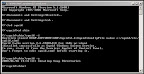
type C:\squid>sbin\squid.exe –i

then type C:\squid>sbin\squid.exe –z

open start menu - setting - control panel - administrative tools - services

find service squid

click start


open browser (i.e. mozilla)

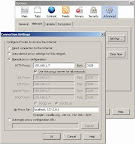
choose from menu bar : tools - option - network - setting

choose manual proxy and enter your computer ipaddress with default squid port (3128)
press ok and ... browsing :)

have it try ...

- Kangkam -